


Canva Video Editor
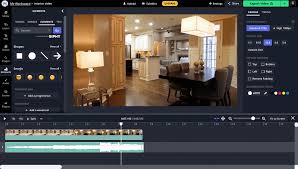
Canva Video Editor is a free, browser-based video editing platform that extends Canva’s intuitive drag-and-drop design experience into the world of video creation. Designed with accessibility and ease-of-use in mind, it empowers users of all skill levels to produce visually stunning videos without the need for complex software or prior editing experience. From marketing videos and Instagram Reels to presentations and YouTube intros, Canva provides everything you need to create professional-quality content quickly.
The editor is seamlessly integrated into Canva’s broader design ecosystem, allowing users to combine images, animations, text, audio, and video clips in a single workspace. Canva Video Editor features a timeline-based editing interface, where users can trim clips, layer visuals, and add transitions with just a few clicks. It also offers a massive built-in library of templates, stock footage, licensed music tracks, animated elements, and fonts — all designed to help streamline the creative process and maintain consistent branding across all media.
One of Canva’s biggest strengths is its real-time collaboration. Teams can co-edit video projects, leave comments, and version their content entirely online, making it an excellent choice for marketers, educators, and remote teams. Canva’s AI-powered tools also simplify tasks like background removal, automatic resizing for different platforms (e.g., square for Instagram, vertical for TikTok), and brand kit integration for consistent colors, logos, and fonts.